
Mobile App or Browser Play: Which Costs You More in Fees and Lag

TL;DR: For a licensed real-money casino or sportsbook, deposit fees are usually identical between the mobile app and the mobile browser, because both route money through the same payment processor. The real gaps show up in three places. These include sweepstakes “gold coin” purchases that can go through app-store billing, mobile data consumed by repeat browser visits, and input lag from the browser’s rendering engine plus reconnects on live feeds.
Do you pay more in deposit fees using the app?
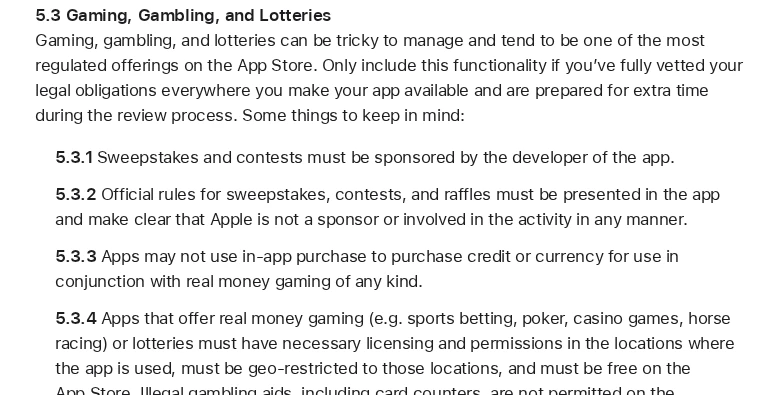
No, and this is the most misunderstood part of the app vs browser gambling fees question. Apple’s App Store Review Guidelines explicitly forbid using in-app purchase to buy credit or currency for real-money gaming, and forbid initiating fund transfers through IAP. A licensed sportsbook or casino app therefore has to use its own payment processor (card, bank transfer, or e-wallet), exactly the same rail the mobile browser checkout uses.
That single rule collapses most of the imagined fee gap. When a player deposits into a real-money account, the money never touches Apple’s or Google’s billing system. It goes from the player’s card or bank to the operator’s payment processor, and that processor charges the operator the same percentage whether the request originated inside a native app or inside a browser tab. Same rail, same fee.
Players assume otherwise because app stores take a cut on almost everything else, including music, subscriptions, and one-off purchases. Gambling credit is the exception. The mechanism is regulatory and contractual, not a favour to players. App stores don’t want to sit in the flow of funds for regulated wagering, so they ban it outright. The user-facing effect is that the “app deposit surcharge” most people expect simply doesn’t exist at licensed real-money operators. If an operator does charge a deposit fee, it’s the operator’s own policy, and it will normally apply identically across both channels.
Where does the app vs browser fee gap actually exist?
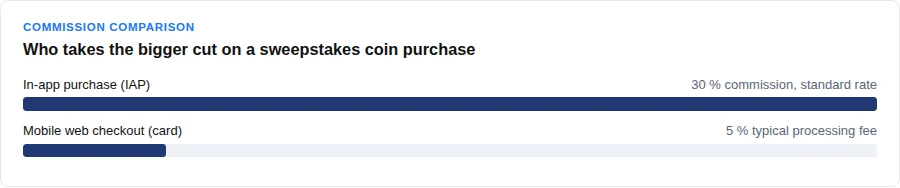
In sweepstakes and social-casino models, where “gold coin” purchases are legally a product purchase rather than a wager. That distinction matters because it’s what allows those purchases to run through Apple’s or Google’s in-app purchase system, and IAP commission is up to 30% at the standard rate, or 15% for developers in the small-business program under a revenue threshold.
Compare that to a mobile web checkout, where a card processor typically takes something in the 3–5% range. A coin package that nets an operator roughly 94–97 cents on the browser dollar can net as little as 70 cents on the in-app dollar. That’s not a rounding error; it’s a structural difference in who gets paid.
The effect shows up in pricing rather than in a line item. Operators who sell coin packages through IAP tend to handle this in one of three ways. They price the in-app package higher for the same coin count, offer fewer bonus coins per dollar in-app, or nudge buyers toward the mobile website checkout. None of those is presented as a “fee.” It’s baked into the exchange rate between dollars and coins, which is exactly why it’s easy to miss.
If a reader plays at a sweepstakes-style site, this is the one place where the channel genuinely changes what a dollar buys. If a reader plays at a licensed real-money operator, it doesn’t. See the deposit rail explanation above.
Is there a hidden cost in mobile data usage?
Yes, and it functions like a fee even though no receipt shows it. General mobile-browsing benchmarks cluster around 24–60 MB per five minutes of active use, depending on the browser. An installed app downloads its shared UI assets (icons, layout, fonts, game shells) once, caches them locally, and afterwards re-downloads only new content like odds, balances, and game state.
A browser tab is less reliable about this. Repeat visits can re-download page assets if the browser cache has been cleared, is small, or the site’s cache headers are weak. On a metered data plan, that recurring re-download is a real cost. It’s not labelled a fee, but it consumes the same allowance a player would otherwise spend on anything else.
The difference compounds with session length. A player who opens the browser version daily re-fetches the shell daily; a player who opens the installed app daily fetches the shell once. Over a month on a capped plan, that’s the difference between paying for new information and paying repeatedly for the same information.
Why does the browser feel laggier than the app?
Because the browser inserts a rendering engine (DOM, CSS, and JavaScript execution) between a tap and the response, while native app code runs directly on the device OS. That layer is the main source of input lag on browser play. In practice, this is most noticeable on fast interactions like tapping a bet slip, switching markets, or dragging a live-dealer view, especially on a slower device or connection.

Session handling widens the gap. A native app can keep a session token and credentials cached locally and reuse a persistent connection. A browser tab more often has to re-authenticate or re-fetch session state on each fresh page load, especially after the OS backgrounds or kills the tab to reclaim memory. That’s the mechanism behind the classic complaint that the browser version “forgot” the player after switching apps for a minute.
Neither of these is a matter of taste. They’re two different technical implementations of the same product, and the browser one carries more overhead by design. The trade-off is that the browser needs no install and no storage, and it works on any device with a modern engine.
Why do live dealer feeds and live odds stutter after idling?
Because mobile networks and load balancers frequently kill idle WebSocket connections long before desktop defaults do. Live dealer video and ticking odds are commonly built on WebSocket connections in both app and browser, but a commonly cited mismatch is idle timeouts as short as roughly 60 seconds on some mobile networks versus multi-hour keep-alives elsewhere.
When the socket dies, the client has to reconnect, resynchronise state, and in the live-dealer case renegotiate the media stream. That reconnect sequence is where “lag spikes” after idling come from. The feed doesn’t degrade gradually; instead, it drops and catches up. An app with a persistent connection and locally cached session can often resume faster, but it isn’t immune. If the network kills the socket, both channels reconnect.
This is general mobile-network behaviour, not a property of any specific carrier or operator. It also explains why the problem is worse on the move (commuting, switching cells) than on a stable connection at home. For a deeper look at how live-feature infrastructure is evolving as latency budgets tighten, see how next-generation gambling platforms are being built around persistent low-latency connections.
App vs browser: side-by-side
| Factor | Native app | Mobile browser |
|---|---|---|
| Real-money deposit rail | Operator’s processor | Operator’s processor (same) |
| Deposit processor fee | Same rate | Same rate |
| Sweepstakes coin purchase | Can use IAP, up to 30% commission | Card processing, typically 3-5% |
| Shared UI assets | Downloaded once, cached locally | May re-download on repeat visits |
| Session state | Token cached locally, persistent connection | Often re-authenticated per fresh load |
| Input latency | Native code on device OS | Rendering engine adds a layer |
| Live WebSocket reconnect | Possible after idle timeout | Possible after idle timeout |
| Install and storage | Required | None |
What this means for choosing a channel
The decision depends on what kind of site is being used, not on a blanket verdict.
At a licensed real-money casino or sportsbook, deposit fees are effectively identical across app and browser, so the choice comes down to lag and data. The app wins on input latency and repeat-visit data use; the browser wins on zero install and instant access. For players who log in daily on a metered plan, the app’s cached assets and persistent session are the more economical option over a month. For occasional players, the browser’s overhead is trivial. Either way, it’s worth checking what security features a mobile gambling site actually implements before installing anything. A native shell doesn’t improve the underlying transport. And if comparing against a laptop setup matters, the trade-offs between mobile and desktop play are worth reading before committing to a channel. For a shortcut to the strongest options, a rundown of the top mobile gambling apps covers what to look for.
At a sweepstakes or social-casino site, the calculus shifts, because coin purchases can route through in-app purchase and carry that commission. Buying coins through the mobile web checkout is typically the cheaper path, and the pricing difference is usually visible if the same package is compared side by side in both channels.
Whichever channel is chosen, convenience doesn’t change the arithmetic of a bankroll. Deposit limits and self-set budgets do the work that no app or browser can do on a player’s behalf. The practical steps are set out in this guide to playing within your limits.
The fee gap players expect on real-money deposits mostly isn’t there, the fee gap on sweepstakes coin purchases mostly is, and the lag gap is a rendering-and-connection story that favours the app slightly and the browser on convenience. Match the channel to the site type, and the decision makes itself.
Frequently asked questions
Does the app charge lower deposit fees than the browser?
For real-money wagering, no. Apple’s guidelines forbid using in-app purchase for gambling credit, so the app must use the operator’s own payment processor, the same rail the browser checkout uses. The processor fee is the same either way.
Why do coin packages sometimes cost more in the app?
Because sweepstakes-style coin purchases can legally run through app-store in-app purchase, which carries up to 30% commission (15% for qualifying small-business developers) versus a typical 3–5% card-processing fee on a web checkout. Operators recover that difference through pricing or bonus structure rather than a visible surcharge.
Does the browser really use more mobile data?
On repeat visits, often yes. General mobile-browsing benchmarks put usage around 24–60 MB per five minutes of active use depending on the browser, and repeat visits can re-download page assets if the cache is cleared or small. An installed app caches shared UI assets once and only re-downloads new content.
Why does the live dealer feed freeze after a minute of inactivity?
Mobile networks and load balancers frequently kill idle WebSocket connections, with some idle timeouts as short as roughly 60 seconds. When the socket dies, the client reconnects and resynchronises, which shows up as a lag spike rather than a gradual slowdown.
Is the app always faster?
Not always, but the mechanism favours it. Native code skips the browser’s rendering-engine layer, and a cached session token avoids re-authentication on fresh loads. On a stable connection with a warm browser cache, the gap narrows considerably.